
INFORMATION NOTICE ON THE USE OF ACADEMIC LEAVE
An Academic Leave option has been created in the Logo system for Research Assistants and Lecturers pursuing master's or doctoral studies, enabling them to attend their academic activities.
Academic Leave allows personnel to take leave on specific days of the week in accordance with their academic schedules. Depending on individual circumstances, leave can be defined for 1, 2, or 3 days per week.
1. How to Request Academic Leave?
Academic Leave requests can be submitted through two different methods:
-
Personnel Corporate Portal: Personnel can submit an Academic Leave request through the portal.
-
Human Resources Department: The Human Resources Department can also create the leave request through the Logo system.
2. Important Points to Consider When Creating a Leave Request
The following steps should be followed when creating a leave request through the Logo system:
-
Access the Main Menu.
-
Navigate to the Movements tab under the Time Management menu.
-
Select Leave Requests.
-
Click the Add button to open the Leave Request screen.
-
Select Academic Leave as the leave type.
-
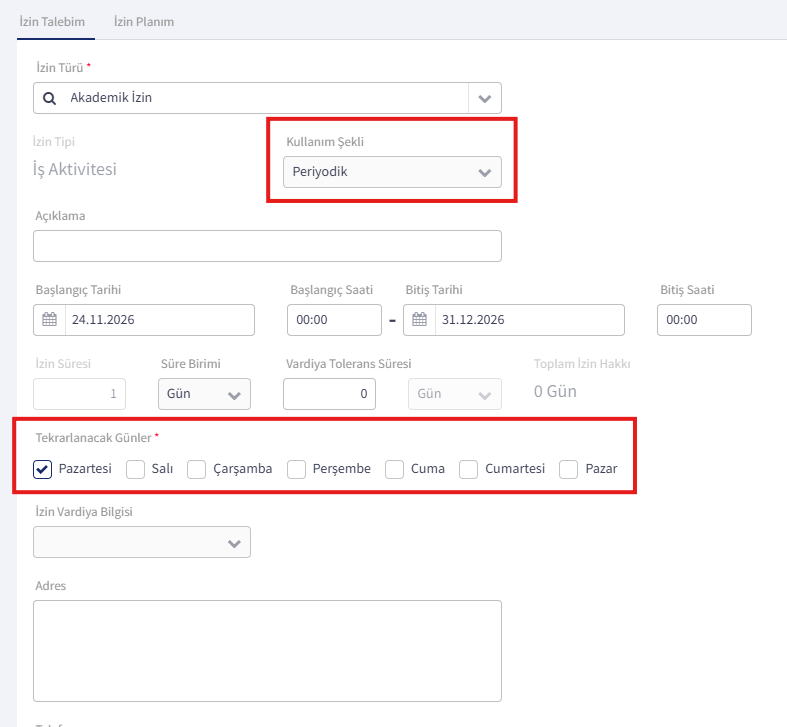
Set the Usage Type field to Periodic.
-
Enter the start and end dates according to the period during which the leave will be valid.
-
Select the days of the week on which the personnel will be on leave in the Recurring Days field.
-
Save the leave request.
3. Important Information
-
The Academic Leave option has been configured so that it does not affect timesheet calculations.
-
It is mandatory to select Periodic in the Usage Type field when creating a leave request.
-
Leave days must be determined in accordance with the personnel's academic schedule.
-
The start and end dates of the leave must be entered in consideration of the relevant academic term.
Support and Information
For questions regarding the definition and use of Academic Leave, please contact the Human Resources Department.